We just wrapped up AG Studio Launch Week See what we shipped

AG Studio: Embedded Analytics for Web Applications

Introducing AG Studio

Embedded analytics. Built to perform.

AG Studio is an embedded analytics toolkit for web applications, built by the AG Grid team. It adds dashboards, charts, data grids and filters to your own app, runs entirely in the browser with no server to install, and keeps your data inside your own infrastructure.

Mobile Notice Mobile Notice

High-performance dashboard by AG Grid

Trusted by developers at

Build without limits

Everything you need to build dashboards

Grids, charts, filters, KPI widgets, and AI-powered insights. Interactive components designed to work together.

Drag & Drop

Rearrange widgets freely with intuitive drag-and-drop. Resize, reorder, and reflow your dashboard layout in real time.

Visit docs
Modes & Layout

Switch between edit and view modes with configurable layout options for different use cases.

Visit docs
Widget Gallery

Browse and add from a library of pre-built chart, grid, and KPI widgets to populate your dashboard.

Visit docs

Embedded analytics suite

Grids, charts, and dashboards. Designed to work together

AG Studio combines high-performance data grids, interactive charts, and dashboard tooling into a single embedded analytics framework.

AG Grid screenshotAG Grid screenshot
AG Charts screenshotAG Charts screenshot
AG Studio screenshotAG Studio screenshot
grid screenshotgrid screenshot

High-performance, feature rich, and fully customisable Data Grids

Visit AG Grid
charts screenshotcharts screenshot

High-performance, canvas-based charting library

Visit AG Charts
studio screenshotstudio screenshot

High-performance, developer-first dashboard library

Enquire about AG Studio

Start a 45-day free trial

Explore the full capabilities of AG Studio with a free trial. No restrictions. No watermarks. Build and test embedded dashboards in your application before committing to a licence.

Start free trial

Full feature access
Access all dashboard, grid, and chart features with no console warnings or watermarks.

45 days to evaluate
Test integration, performance, and fit in your application before purchasing a licence.

Direct engineering support during your trial
Get help from our engineers via Zendesk throughout your trial.
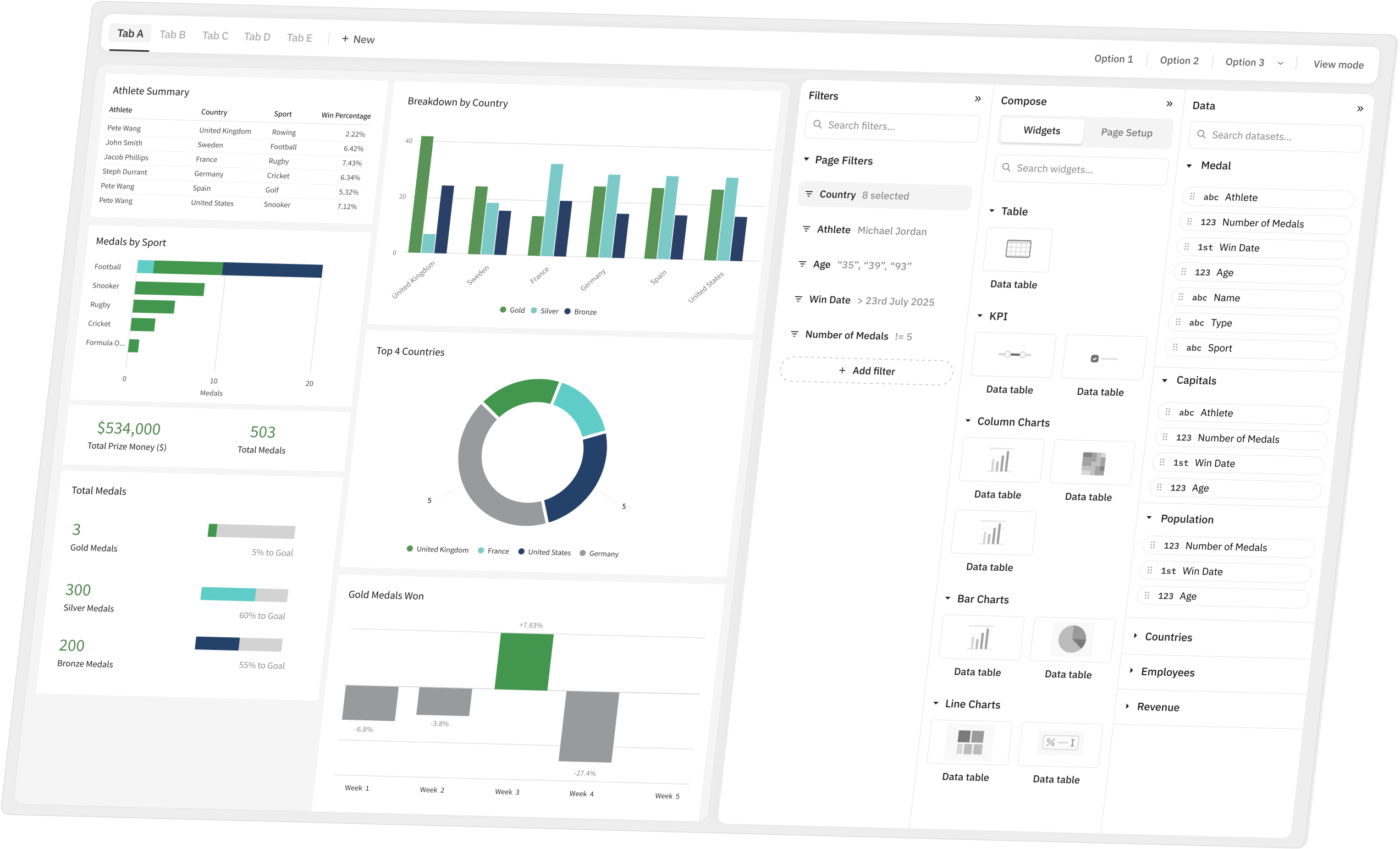
AG Studio Dashboard AG Studio Dashboard Play icon

Build dashboards like this in minutes

Create interactive analytics experiences inside your product using AG Studio.

Start a 45-day trial or speak with our team about integrating embedded analytics into your application.

AG Studio FAQs

Frequently asked questions

What is AG Studio? How is data supplied to it? Which frameworks does it support? Answers to these common questions and more.

Component

What is AG Studio?
Is AG Studio an SDK, or do I need to build the dashboarding myself?
What does AG Studio consist of?
What problems does AG Studio solve?
Is AG Studio a standalone BI tool like Power BI or Tableau?
Which frameworks does AG Studio support?

Data

Does AG Studio have a built-in data engine?
Does AG Studio provide data connectors?
How much data can AG Studio handle?
How is data supplied to AG Studio?
Does AG Studio support server-side data for large datasets?
Is a semantic layer (separate dimension and fact tables) supported?

Customisation

Can AG Studio be themed to match my application's look and feel?
Can the panels in AG Studio be customised?
Does AG Studio support localisation for multiple languages?
Can I use my own components in AG Studio?
Is the built-in table widget a full AG Grid instance?

Reports

Can reports be pre-defined by developers, instead of users?
Can end users export dashboards to PDF or CSV?
Does AG Studio support drill through?
Does AG Studio support commenting or collaborative editing?

Agent Framework

Does AG Studio include AI features?
What data is sent to the LLM?
Can I turn the AI features off?
Which LLM providers can I use?
Does the AI cost extra?

Security and sharing

Is AG Studio fully self-hosted? Does it call back to AG Grid's servers?
How do I save and share reports?
Do you support RBAC?
Can a report be shared via a public link without requiring login?